
Introduction
In large distributed clusters, there are often hundreds of components and a large amount of runtime information that developers need to inspect. Safplus_info is a lightweight tool provided by OpenClovis that helps developers quickly observe and diagnose the state of every component in a cluster.
What is Safplus_info?
Safplus_info is a command-line tool (with an optional UI) that displays the current status of OpenClovis SAFplus Platform components and customer application components running in a cluster. It centralizes common inspection tasks — listing topology elements, showing detailed states, and simulating basic failover actions.
Prerequisites
- A full model generated from the OpenClovis IDE.
- The model must be started and running.
Starting Safplus_info
Open a terminal in the bin directory and run the tool with root privileges. For example:
# from the bin directory
sudo ./safplus_info
This is the interface for the first time starting Safplus_info
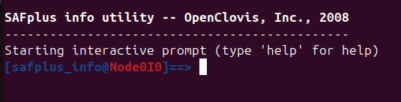
To start the graphical interface (available since OpenClovis 6.1):
sudo ./safplus_info --uiKey commands
Below is an overview of the most commonly used commands and what they do.
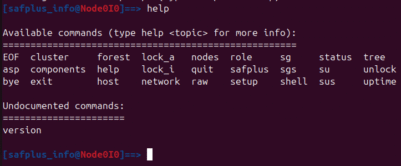
help
Show the full list of available commands.
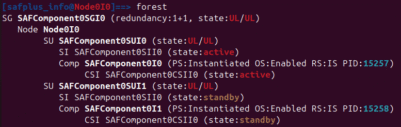
forest
Display the cluster topology and summary information for SG, Node, SU, SI, and other components. Use this to get an at-a-glance view of the cluster structure.
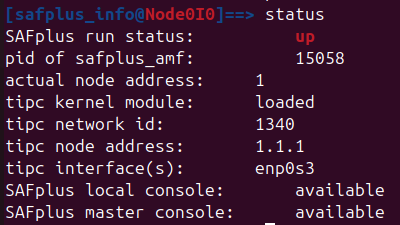
status
Show the current status of the local node (for example: up, down, etc.).
sus
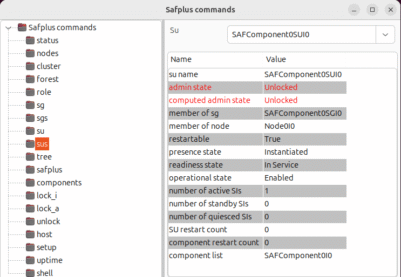
Inspect detailed states for some given SU (Service Unit). This command reports administrative state, presence state, readiness state, and similar attributes.

lock_a
This is a special command applied to sg, node, su, and si to lock the service assignment of them.

lock_i
This is a special command applied to sg, node, and su to lock their initialization.

unlock
Opposite of the lock_a command, this command unlocks the service assignment for sg, node, su, and si.

Safplus_info UI
Starting with OpenClovis 6.1, Safplus_info includes a graphical user interface that provides an intuitive visualization of component states. The UI highlights states and relationships, making it easier to spot anomalies and monitor high-availability behavior. Start it with “sudo ./safplus_info –ui” as shown above.
Conclusion
Safplus_info provides convenience for developers when they need to observe the status of components in a cluster. Helps save time and effort when debugging. In addition, adding functions such as lock_a, lock_i, and unlock makes simulating failover and observing high availability easier and clearer. If you need to know details about the safplus_info, don’t hesitate to reach out to us at support@openclovis.org
Other support, please send email to support@openclovis.org.